Your Legal Resource
Animation In Pov-ray Tutorial
Animation
The reader may notice I am skipping over the more mundane details of creating a scene using POV-Ray and/or a modeling program. I do this because I don't want these pages to rely too much on any particular modeling program, even though I intend to emphasize KPovModeler from time to time, and also the general topic of image design is a very large topic, relying as it does on the reader's interests and aesthetic skills, which may differ greatly from my own. I trust the reader will apply the general information provided here to the more specific goals he or she may have.
As it turns out, even if I focus on general topics and avoid specific issues, we cannot avoid some platform-dependent difficulties, and animation has some of those difficulties. But, since I already said I intended this page set primarily for the Linux user, and others may follow along, some of the details I present won't come as too much of a surprise.
POV-Ray animation is very easy, and there are only a few things one need to learn:
- POV-Ray animation relies on a special variable that POV-Ray defines internally. The variable is named "clock".
- In preparing a scene description for animation, one need only associate the predefined "clock" variable with the desired action. For example, to spin the camera around an object 360 degrees, one can simply say "rotate <0, clock * 360,0<" at an appropriate place in the scene description, and the resulting animation will consist of frames in which the camera's viewpoint spins through a full circle.
- The clock variable's value is normalized, that is to say, it varies between 0 and 1 during the user-selected number of frames, regardless of the chosen number of frames. If the user chooses 10 frames, the clock value starts at 0 and increments by 1/10 on each new frame. If the user chooses 1000 frames, the clock value still changes between 0 and 1, but it will do so in steps of 1/1000. This means you only have to ask yourself how many frames you care to generate, there are no extra calculations to perform � a particular scene description will produce the expected animation regardless of how many frames is chosen after the fact.
- Some platform dependency issues will come up when we decide what to do with the animation frames that POV-Ray creates. This is an easy problem to solve on Linux, where there are a number of ways to view the animation, create a special animation file out of the frames, and so forth. For those using other operating systems, you will have to sort out these steps on your own.
Example to be animated:
camera {
perspective
location <5, 5, -5>
sky <0, 1, 0>
direction <0, 0, 1>
right <1.3333, 0, 0>
up <0, 1, 0>
look_at <0, 0.5, 0>
angle 30
// special animation entry:
rotate <0, clock * 360, 0>
}
light_source {
<-50, 50, -50>, rgb <1, 1, 1>
}
box {
<-0.5, -0.5, -0.5>, <0.5, 0.5, 0.5>
pigment {
color rgb <0.380392, 1, 0.223529>
}
scale 1
rotate <0, 0, 0>
translate y*0.5
}
plane {
<0, 1, 0>, 0
pigment {
checker
color rgb <1, 1, 1>
color rgb <0.611765, 0.611765, 0.611765>
}
scale 1
rotate <0, 0, 0>
translate <0, 0, 0>
}
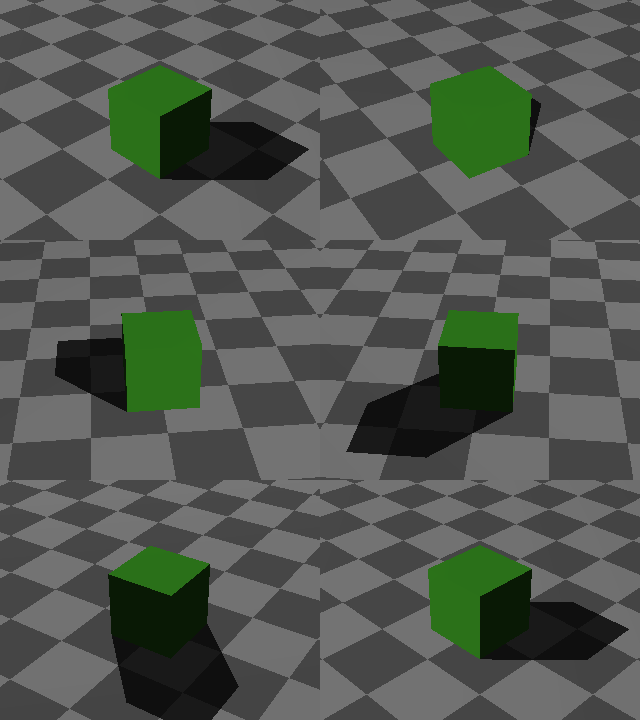
Notice about this scene description that there is only one change in one line to allow it to be used as the source for an animation. Now click the animation graphic on this page to see how it turned out. This particular rendering is just 24 frames, to save download time for those who (like me) have slow Internet connections.
Now it's time for you to try creating an animation. Please follow these steps:
- 1. Copy and paste the above scene description, or click here to acquire the script in a separate browser window. Save it as a file on your local system with the suffix ".pov". Let's say for this example that we have named the file "animation1.pov".
- 2. Choose a directory for this activity that is empty, since POV-Ray will be creating a lot of individual frames. If the directory is not empty, at least make sure it doesn't have any other graphic files in it. Put the scene described in this empty directory.
- 3. Now we can tell POV-Ray to animate our scene.
- Open a command shell and type:
$ povray +KFI1 +KFF24 animation1.pov
- Remember not to type the "$" at the beginning of the line. This is just a way for me to tell you the context for the typing, that is, a command shell.
- POV-Ray will now create 24 frames of animation, at a default resolution of 320x240 pixels.
- For future reference, to create a longer, smoother-running animation, just replace the number "24" in the above line with a larger number. And to specify a larger frame size, include (for example) " +w640 +h480" on the command line.
- 4. Now to view the animation. Remember that my default reader is running Linux, those running other operating systems will have to sort this step out for themselves. Assuming you have a relatively recent Linux distribution and chose to install most of everything or (my favorite) all of everything, you will have the ImageMagick utilities in place. The next few steps assume this.
- In the previously opened command shell, type:
$ animate *.png
- With any luck at all, "animate" will display an animation of your generated frames. The frames will probably be displayed too fast, so try this next:
$ animate -delay 6 *.png
- The argument "-delay 6" means "delay 60 milliseconds between frames."
- 5. Now let's create a single file containing your animation. We'll use an animated GIF format. Although there are many alternative formats, some more efficient, this has the advantage of being simple and I don't need to know much about your system's configuration.
- In the previously opened command shell, type:
$ convert -loop 1 -delay 6 *.png animate1.gif
- This command will create an animated GIF file named "animate1.gif". The option "-loop 1" means "don't loop endlessly." As with "animate," the argument "-delay 6" means "delay 60 milliseconds between frames." As you begin to specify more frames in your animations, remember to change or eliminate this delay.
- 6. Now you can post your animation on your Web site, show it off to your friends, or spend hours fine-tuning the scene description in a vain pursuit of perfection.